
Mobile App Development Process Explained Step by Step
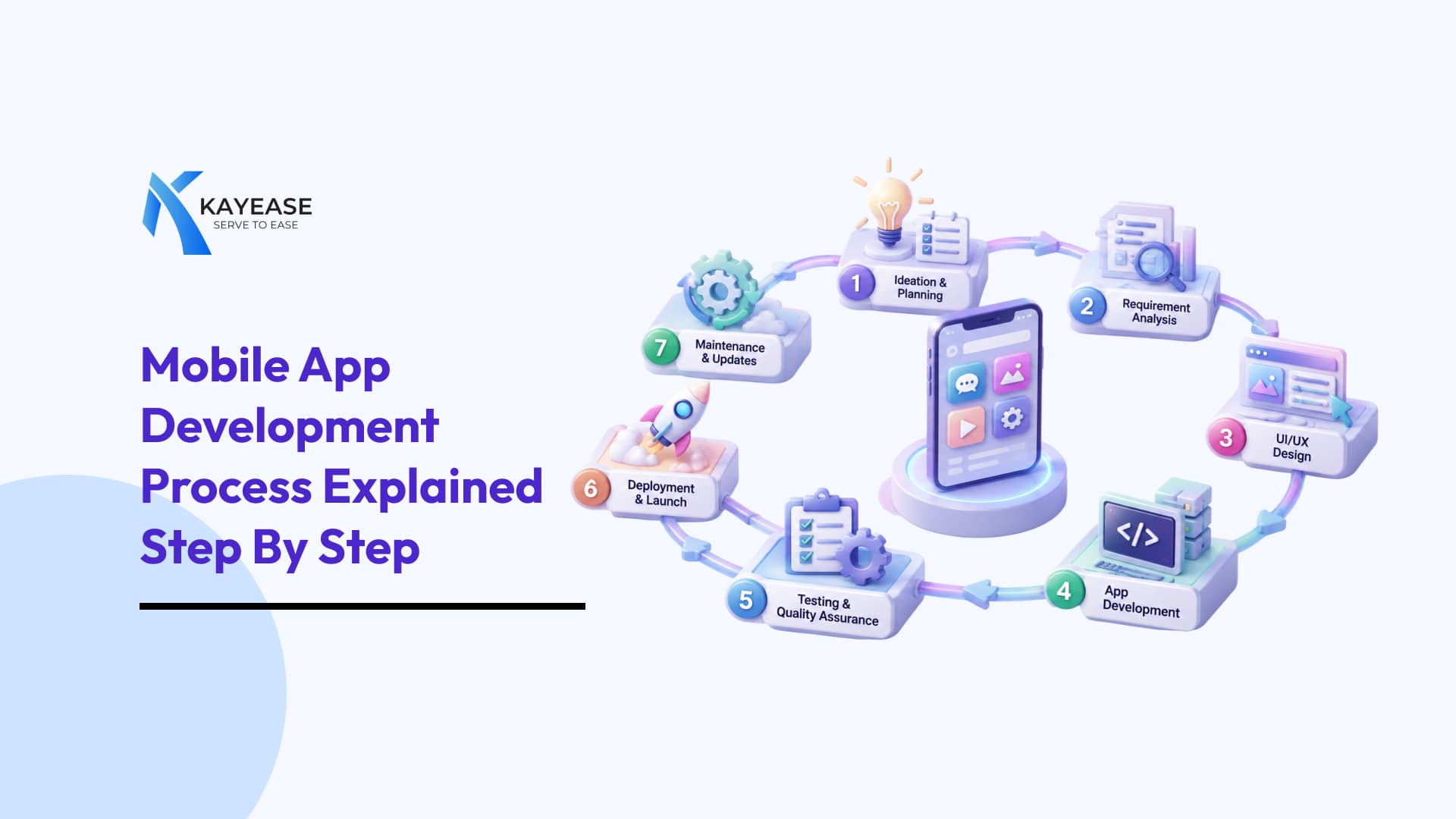
Learn the mobile app development process step by step from idea and research to UI/UX design, development, testing, deployment, and ongoing maintenance, with key considerations for businesses in India.
Mobile App Development Process Explained Step by Step
From ordering food on Swiggy to booking a cab on Ola or making payments through UPI, mobile apps have become a major part of everyday life in India. For businesses, a mobile app is no longer simply an additional digital channel; it can become a direct way to reach customers, automate processes, increase sales, and build long-term engagement.
But creating an app involves much more than designing a few screens and publishing them on the Play Store. A successful app requires proper research, planning, UX/UI design, development, testing, deployment, and continuous improvement.
This guide explains the mobile app development process step by step, with a focus on what businesses in the Indian market should consider.
What Is the Mobile App Development Process?
Mobile app development is the structured process of turning an app idea into a working digital product. It begins with identifying a problem or business opportunity and continues through planning, design, development, testing, launch, and maintenance.
For an Indian business, this could mean anything from creating an e-commerce app for customers across multiple cities to developing an internal employee app for managing operations.
The process generally includes:
- Idea and problem identification: Understanding what problem the app will solve.
- Market research: Studying users, competitors, and market demand.
- Planning: Defining features, technology, budget, and timeline.
- UI/UX design: Creating an easy and engaging user experience.
- Development: Building the frontend, backend, database, and integrations.
- Testing: Checking functionality, performance, security, and usability.
- Deployment: Publishing the app and making it available to users.
- Maintenance: Updating, securing, and improving the application.
Types of Mobile Apps
Before development starts, businesses need to decide what type of application they want to build.
Native Apps
Native applications are developed specifically for a particular operating system.
For example:
- Android: Kotlin or Java
- iOS: Swift
Native development can provide strong performance and access to platform-specific features. This can be useful for apps that require advanced device capabilities, high performance, or a highly customized experience.
Cross-Platform Apps
Cross-platform development allows businesses to create applications for Android and iOS using a shared codebase.
Popular technologies include:
- Flutter
- React Native
For many Indian startups and growing businesses, this can be an attractive option because it can reduce development effort while allowing the app to reach users on both major platforms.
Progressive Web Apps
Progressive Web Apps, or PWAs, are web applications designed to provide an app-like experience through a browser.
They can be useful for businesses that want users to access their service without immediately installing a traditional mobile application.
What Should You Consider Before Developing a Mobile App?
Before writing the first line of code, businesses need to make several important decisions.
1. Understand Your Target Audience
The first question should not be “What features should our app have?”
It should be:
“Who is going to use it?”
India has an extremely diverse mobile audience. A customer in Mumbai may have very different expectations from a customer in a smaller city or town.
Consider factors such as:
- Age group
- Location
- Language preference
- Device type
- Internet connectivity
- Spending behaviour
- Digital familiarity
- Preferred payment methods
For example, a retail app targeting customers across India may need to consider regional languages, multiple payment options, different delivery locations, and users accessing the app on different Android devices.
Understanding users early helps businesses avoid building features that customers do not actually need.
2. Define Performance Requirements
Indian users may access applications through a wide range of devices and network conditions. Your app therefore needs to perform reliably beyond high-end smartphones and fast Wi-Fi connections.
Important areas include:
- Fast loading
- Efficient data usage
- Low battery consumption
- Image and video optimization
- Smooth navigation
- Reliable API responses
- Offline or low-connectivity support where required
Performance is particularly important for apps used outside major metropolitan areas, where network quality and device capabilities can vary significantly.
3. Consider Technical Requirements
Every app has different technical requirements.
You may need to plan for:
- Backend architecture
- Database requirements
- APIs
- Cloud hosting
- Authentication
- Push notifications
- Payment gateways
- Maps and GPS
- Third-party integrations
- Data security
- Analytics
For an Indian e-commerce or service application, integrations such as UPI, payment gateways, SMS/OTP verification, location services, and WhatsApp or notification systems may become important parts of the technology architecture.
4. Set a Realistic Budget
The cost of developing an application depends heavily on its complexity.
A basic application with a few screens will require a very different budget from an app involving real-time tracking, payments, chat, AI, or complex backend systems.
Instead of trying to build everything at once, businesses can start with an MVP (Minimum Viable Product).
An MVP focuses on the core features needed to launch and validate the idea. Additional features can then be introduced based on actual user feedback.
5. Think About Security and Compliance
Mobile applications often handle sensitive information such as names, phone numbers, addresses, payment information, and account credentials.
Security should therefore be considered from the beginning.
Businesses should pay attention to:
- Secure authentication
- Data encryption
- Secure APIs
- Access controls
- Payment security
- Privacy policies
- User consent
- Secure data storage
Apps operating in India should also consider applicable Indian data protection and sector-specific requirements rather than treating compliance as something to address after development.
Mobile App Development Life Cycle
Now that the initial requirements are clear, let's look at the actual mobile app development process step by step.
Step 1: Idea and Market Research
Every application starts with an idea, but an idea alone is not enough.
The first stage is to determine whether there is a genuine need for the product.
Research should include:
- Identifying the problem
- Understanding potential users
- Studying competitors
- Analysing existing solutions
- Identifying market gaps
- Defining the app's unique value
For example, if you want to build a local grocery delivery app, you should first understand how customers currently order groceries, what existing platforms offer, where delivery problems occur, and what your app can do differently.
The goal is to turn an idea into a clearly defined business opportunity.
Step 2: Define Features and Create an MVP
Once the opportunity is validated, decide what the first version of the app actually needs.
Create a list of:
- Must-have features
- Future features
- User roles
- Admin requirements
- Third-party integrations
- Business requirements
For example, a basic food delivery MVP may include:
- User registration
- Restaurant listing
- Menu browsing
- Cart
- Order placement
- Online payment
- Order status
Features such as loyalty programmes, AI recommendations, advanced analytics, or subscription plans can be added later.
This approach keeps the first release focused and easier to validate.
Step 3: UX and UI Design
Once the features are defined, designers begin creating the app experience.
UX focuses on how the application works, while UI focuses on how it looks and feels.
The process may include:
- User flows
- Wireframes
- Prototypes
- UI design
- Design system
- Usability feedback
For Indian audiences, designers may also need to consider multiple languages, different screen sizes, accessibility, simple navigation, and users with varying levels of digital experience.
A good design should make it obvious what users need to do next.
Step 4: Choose the Technology Stack
The development team then selects the technologies required to build the application.
Depending on the project, this could include:
Android: Kotlin, Android Studio
iOS: Swift, Xcode
Cross-platform: Flutter or React Native
Backend: Node.js, Python, Java, .NET, or other suitable technologies
Database: MongoDB, MySQL, PostgreSQL, or other database systems
The right choice depends on the application's requirements, the development team's expertise, scalability needs, and budget.
Step 5: Develop the App
Now the actual development begins.
Developers typically work on:
- Frontend
- Backend
- APIs
- Database
- Authentication
- Admin panel
- Third-party integrations
Development can be divided into smaller sprints so that individual features can be built and reviewed progressively.
For example, an e-commerce application may first develop registration and product browsing, followed by cart functionality, payments, order management, and notifications.
This makes it easier to identify problems early instead of discovering them at the end of the project.
Step 6: Integrate Payments and Other Services
Modern Indian mobile applications often rely on external services.
Depending on the business model, integrations may include:
- UPI
- Payment gateways
- OTP/SMS services
- Google Maps
- Push notifications
- Social login
- Cloud storage
- Analytics
- CRM systems
For example, an Indian marketplace may need payment integration, delivery tracking, automated notifications, and CRM integration within the same application ecosystem.
Step 7: Test the Application
Testing ensures that the application works as expected before it reaches customers.
Testing should cover:
- Functional testing
- UI testing
- Integration testing
- Performance testing
- Security testing
- Device compatibility
- User acceptance testing
Testing across different Android devices is particularly important because India's Android market includes a broad range of screen sizes, hardware configurations, and operating-system versions.
The goal is not simply to find bugs. It is to make sure the overall experience is reliable.
Step 8: Deploy the App
After testing and final approval, the app is prepared for release.
For most businesses, this means publishing on:
- Google Play Store
- Apple App Store
The team needs to prepare app descriptions, screenshots, icons, privacy information, permissions, certificates, and other required store information.
Businesses can also consider a phased rollout rather than making the application available to everyone at once.
Step 9: Monitor User Feedback
Launching the application is not the end of development.
After launch, businesses should monitor:
- App crashes
- User reviews
- Downloads
- Active users
- Retention
- Conversion
- Feature usage
- User complaints
Analytics can reveal what customers actually do inside the app instead of relying only on assumptions made during development.
For example, if users repeatedly abandon the checkout page, the business can investigate whether the process is too complicated or whether a payment issue is causing the problem.
Step 10: Maintenance and Continuous Improvement
A mobile app needs ongoing maintenance after launch.
Regular work may include:
- Bug fixes
- Security updates
- Performance improvements
- OS compatibility
- New features
- UI improvements
- Server maintenance
- Database optimization
User expectations also change over time. An app that works well today may need significant improvements as competitors introduce new features and technology evolves.
Mobile App Development Best Practices
Keep the User at the Centre
Every feature should solve a real user problem.
Avoid adding features simply because competitors have them. A simpler application that solves the right problem can be more valuable than an application overloaded with unnecessary functionality.
Optimize for Different Devices
Do not design only for the newest smartphone.
Consider:
- Different screen sizes
- Different Android devices
- Older operating systems
- Limited storage
- Variable network speeds
Make Security a Priority
Security should be built into the architecture rather than added at the final stage.
Use secure authentication, protect APIs, encrypt sensitive information, and regularly review vulnerabilities.
Build for Scalability
Your application may start with 1,000 users and eventually serve 1 lakh or 10 lakh users.
The architecture should therefore be designed with future growth in mind.
Use Analytics
Analytics can help answer questions such as:
- Which feature is used most?
- Where do users leave?
- How long do users stay?
- Which screens have the highest engagement?
- Which features should be improved?
These insights help businesses make decisions based on actual behaviour.
How Much Does Mobile App Development Cost in India?
There is no fixed cost for developing a mobile application.
The budget depends on factors such as:
- Number of platforms
- Feature complexity
- UI/UX requirements
- Backend architecture
- Number of integrations
- Development team
- Security requirements
- Testing
- Maintenance
A simple business app may cost significantly less than a complex application involving real-time tracking, payments, chat, AI, or large-scale infrastructure.
Instead of choosing an app development budget based only on the number of screens, businesses should estimate the complete product lifecycle from planning and development to deployment, hosting, maintenance, and future upgrades.
Choosing the Right Mobile App Development Approach
Businesses generally have three major options.
Native Development
Best when you need maximum platform-specific performance and functionality.
Cross-Platform Development
Useful when you want to target Android and iOS while sharing a significant portion of the codebase.
Progressive Web App
Suitable for businesses that want an app-like experience accessible through a browser without requiring a traditional app installation.
The right approach depends on your users, features, budget, timeline, and long-term product strategy.
Mobile App Development Checklist
Before launching your application, make sure you have:
- Defined the target audience
- Identified the problem being solved
- Researched competitors
- Prioritized MVP features
- Planned the budget
- Selected the appropriate technology
- Designed the UX/UI
- Built and integrated the backend
- Tested across relevant devices
- Checked security requirements
- Prepared for Play Store/App Store submission
- Set up analytics
- Planned post-launch maintenance
Final Thoughts
Building a mobile application is not a one-time coding project. It is a continuous process that starts with understanding a real problem and continues through research, design, development, testing, launch, and improvement.
For businesses in India, successful app development also means understanding the diversity of the Indian digital market, from Android-first users and varied internet speeds to UPI payments, regional preferences, and different customer behaviours.
The strongest applications are not necessarily the ones with the most features. They are the ones that solve a genuine problem, offer a smooth experience, perform reliably, and continue improving based on real user needs.
With the right strategy, technology, and development partner, an app can move from a simple business idea to a scalable digital product.
Never miss a post
Subscribe to our RSS feed and every new article lands in your reader automatically — no email, no algorithm.
Works with Feedly, Inoreader, NetNewsWire and any other reader. View raw feed